A project can move forward well before its final delivery. A first draft exists, a piece of feedback points to a direction, or a question is no longer holding things up. Spotting those changes helps you decide which action to take now.
1. Go back to the expected result
Remind yourself what you want to achieve. For a portfolio, the result might be a page showcasing three projects and a way to get in touch. For a presentation, a reviewed deck ready to send.
That reference tells you what your completed tasks were actually worth. Having tested five colors doesn’t tell you the same thing as having the three texts you need for the first version, even if both took work.
If the expected result is still vague, sharpen it with the method for breaking down a project. You’ll then be able to see which steps bring it closer.
2. Note what exists now
Ask yourself a concrete question: “What exists today that didn’t exist at my last review?”
You might list:
- A draft far enough along to get feedback.
- A comparison that lets you choose an option.
- A permission you’ve obtained.
- A part of the project that’s been delivered.
- A decision that clarifies or reduces the remaining work.
Research can count too if it answers a question. Keep the conclusion and what it means for the project, not just a list of the pages you read.
3. Read completed tasks in context
The number of checked-off tasks shows which actions were recorded as done. But their size and their effect on the project can vary enormously.
“Rename a file” and “Write a first draft” each count as one task, yet they don’t represent the same amount of work. And if you add new steps as you learn more about the project, the remaining list can grow even while you’re making progress.
So look at the list with two questions in mind: what did these actions make possible, and what do you still need to reach the intended result?
4. Use time spent to revisit your estimates
The time recorded during focus sessions gives you a trace of part of your work. It doesn’t necessarily cover your whole day: some conversations or tasks happen without a timer.
Compare activities that are reasonably similar. If writing a first text took several sessions, keep that in mind when you plan the next ones. Still, check whether the information available and the difficulty are comparable.
A long session with little text produced deserves a question, not an instant verdict on your efficiency. Maybe you clarified the outline, explored a lead or ran into missing information. Note whatever will explain your next decision.
5. Run a review that leads to an action
Here’s a fictional example for a portfolio in progress:
| Review question | Possible answer | Decision for what’s next |
|---|---|---|
| What moved forward? | Three projects are selected and one text is written. | Prepare the second text. |
| What did I learn? | The first text needed more research than expected. | Gather the information before the next session. |
| What’s blocking? | Permission is missing for one image. | Send a request and keep an alternative in the notes. |
| What can wait? | The home page animation. | Save it for a later version. |
This review ties each observation to a decision. It helps you choose the work that’s useful next and adjust where it fits in your week.
Reviewing projects and sessions in Keepio
Keepio lets you review a project’s progress, its completed tasks and the ones that remain. Notes can hold the decisions you’ve made and the blockers left to resolve.
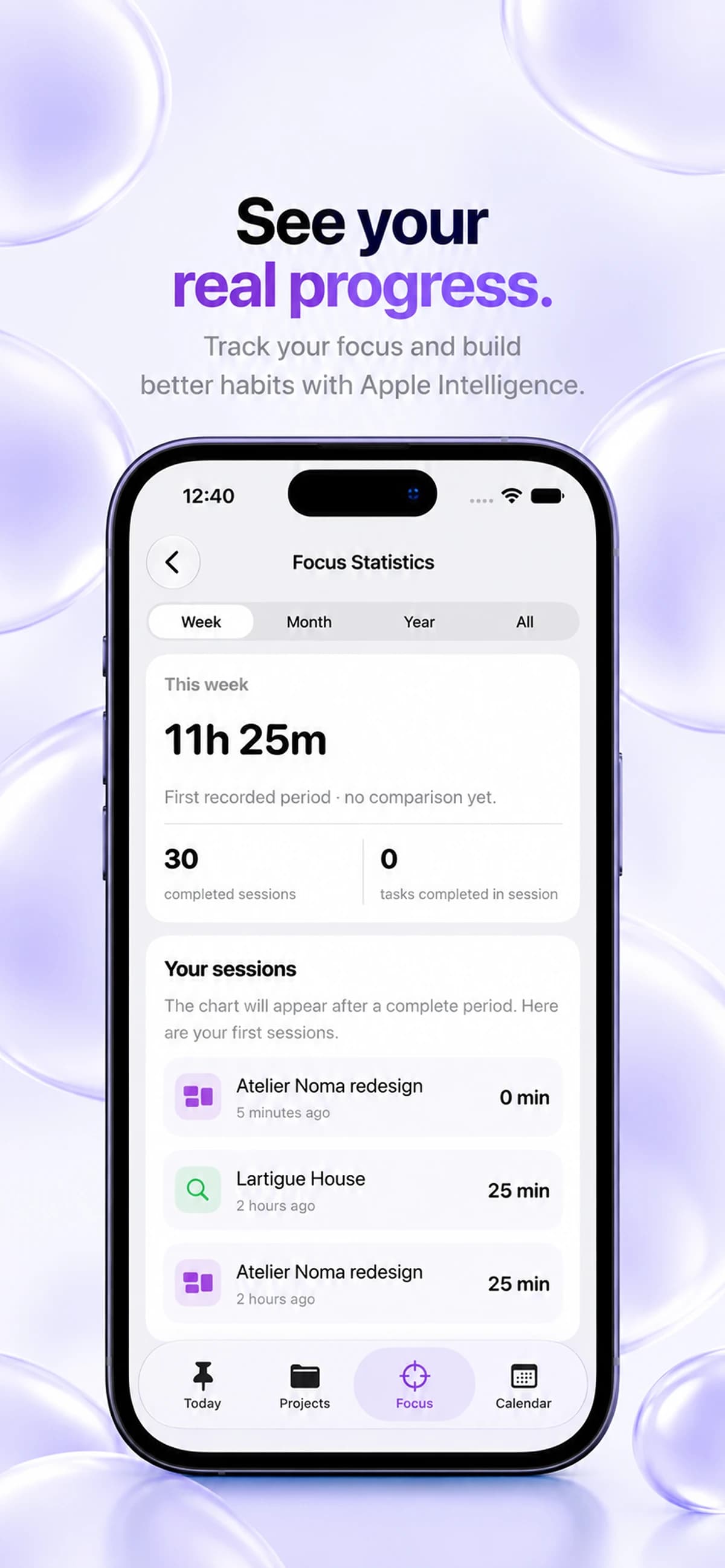
Focus statistics show recorded time, completed sessions and recent activity. You can check them to understand the time you’ve spent on your projects, then adapt your next sessions. The guide on Pomodoro explains how to give these work periods a concrete goal.
Your project review template
The result I’m aiming for: what I want to achieve.
What has changed: something produced, a decision, or an obstacle cleared.
What still needs clarifying: the question that needs an answer.
What my recent sessions tell me: a useful reference point for planning ahead.
My next action: the concrete step to take.
When it’s scheduled: a realistic place in the week.
Frequently asked questions
How do you measure a project’s progress?
Look at what has changed since your last review: results produced, decisions made, tasks completed and obstacles still in the way. Then compare those changes with the expected result to see what’s left to achieve.
Is the number of completed tasks enough to track a project?
No: “Rename a file” and “Write a first draft” each count as one task without representing the same amount of work. The remaining list can even grow while you’re making progress, because you discover new steps along the way.
What’s the point of tracking time spent on a project?
The time recorded during your focus sessions helps you revisit your estimates for comparable activities. It doesn’t necessarily cover your whole day, and a long session with little to show for it deserves a question rather than a verdict on your efficiency.
Are Keepio’s focus statistics free?
Pomodoro and Focus statistics are part of Keepio+, a one-time purchase (€9.99 in France). Managing tasks, projects and notes stays free and unlimited.
Try this today: pick a project and write down one concrete step forward. Then decide on an action that builds on it, and give it a place in your weekly planning.
Explore Keepio’s focus statistics.